

How to change formation in FPL
The definitive guide to formations in Fantasy Premier League. How do you change an FPL formation and which ones are available?


How do you change formation in FPL and what options are available to fantasy managers?
We answer these questions below as part of our FPL Training Academy series, covering all the basics of the game.
Our How to Play FPLpage covers everything you need to know, with guides for complete beginners and managers who want to gain an edge over the competition and win their mini-leagues.
For everything else, including our tips on best players and expert team reveals, see our Ultimate Guide to FPL – there’s plenty of free information but for access to our best stuff and incredible toolbox, you’ll have to become a Hub member.
What are the available FPL formations?
There are a variety of different formations you can use in Fantasy Premier League and they are influenced by your team selection.
Your team can be arranged in any formation providing that one goalkeeper, at least three defenders and at least one forward are selected at all times.
The eligible formations are as follows:
- 3-4-3
- 3-5-2
- 4-4-2
- 4-3-3
- 4-5-1
- 5-3-2
- 5-4-1
- 5-2-3
The best formation tends to change each year, depending on player prices and their perceived value.
How to change formation in FPL
You are able to change your formation by making substitutions in your FPL team.
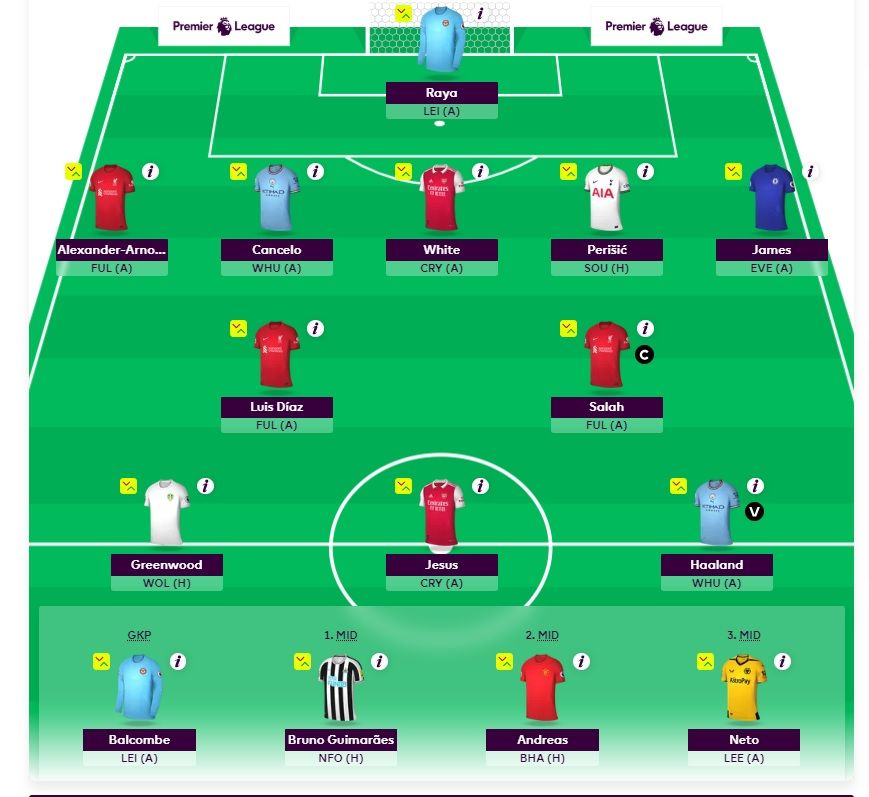
In the example above, the team is set up in a formation of 5-2-3.
It could be changed to a 4-3-3 by clicking on Bruno Guimaraes in the ‘pick team’ tab and swapping him for Ben White.
Remember to click ‘save your team’ to finalise any changes you have made.
You can change your formation gameweek to gameweek.
Deciding your FPL formation
Which formation are you planning to start with in FPL this season?
See how our expert managers decide to line up in our team reveal articles: